
LTO Plate Tracker
You can use this LTO Tracker Tool for tracking your new vehicle plates status online. Here we also provide Track Motorcycle Plate with MV File Number, LTO CR Track Online (for Brand New Vehicles) and LTO Replacement Plates Tracking Tool.
UPDATE May 2026: The Land Transportation Office has shut down the old website LTOTracker.Com and now, the LTONCR.com is the official website for LTO Plate Tracking that is covered under the National Capital Region.
Note: Kindly note that the LTO Tracker for New Plates, Replacement Plates, Backlog Motorcycle Plates and CR Enquiry are available only for vehicles registered in LTO NCR region. If your vehicle was registered outside the National Capital Region (NCR), please contact concerned LTO Office to track your plates or license or CR.
Latest Updates 2026: LTO Plate Tracker
- The LTO NCR has continued to distribute Motor Vehicle Plates and Motorcycle Plates in 2026.
- Land Transportation Office has shut down the old website LTOTracker Com and now, the LTONCR Com is the official website that is covered under the National Capital Region.
- LTO is releasing Replacement Plates in bulk from 2015 (Green to White).
- LTO will distribute New White Plates to the Motorcycle with Old Green Plates.
- Registered in 2017 or earlier, if the vehicles using MV File Number as temporary plate, they can claim New Plates.
- The LTO has already sent so many new plates to Dealers and replacement plates to LTO Offices in the NCR region.
- Motorcycles with 7-Character Plates are eligible to claim New Plates.
- Motorcycle owners whose MV File Number starts with “13” or “1801”, should check and claim their vehicle plates from LTO NCR.
- New Plates are circulated to LTO District Offices and LTO Extension Offices of respective cities and regions of NCR.
- CR Enquiry is available only for Brand New Motor Vehicles and Motorcycles registered at LTO NCR New Registration Unit 1301, 1303 and 1801.
- LTO has already released 8000+ CRs and they are ready for pick up.
- LTO is updating Vehicle Plates and Driver’s License Data in batches, so keep patience.
- If your motorcycle plate number is not mentioned on its CR, you can track it using the MV File Number.
Here we provide separate buttons for LTO Replacement Plates Status Tracking, Backlog Motorcycle Plates Tracking, Driver’s License Delivery Tracking and CR Online Enquiry services. Just click on the concerned button to access the respective service.
Track Brand New LTO Plate
This LTO Tracker is designed for tracking number plates of brand new motor vehicles and motorcycles registered at one of the LTO Offices situated in NCR (National Capital Region).
- To track your brand new vehicle number plate online, just click on the tracking button given above.
- To check its status, you need to enter your vehicle plate number same as appearing in below image.
- Once you enter the plate number correctly, the plate details will show up on screen.
- As shown in above image, you can see all key details below the tracking tool.
- You must provide the correct plate number otherwise it will show incorrect or zero results.
- This tool works only for brand new vehicle plates registered in LTO NCR District/Extension Offices.
- If your plate number does not appear in result, it means that it is still under process and not printed.
- For more queries or tracking issues, contact the LTO Office mentioned on your Certificate of Registration (CR).
- If you don’t have plate number, you can use the other tracking tool that works based on MV File Number.
Track LTO Replacement Plates
The Replacement Plate is a white plate that is going to replace the old green plate in all motor vehicles and motorcycles in the Philippines. The LTO has a purpose to standardize white plates for all vehicles.
The LTO is processing and distributing all replacement plates for which the registration renewal and payment was completed in 2015.
To track your vehicle replacement plates online, just click on the tracking button mentioned above. As you land on the tracking page, enter your plate number to track the replacement plates status instantly. Check the image given below to know how it works.
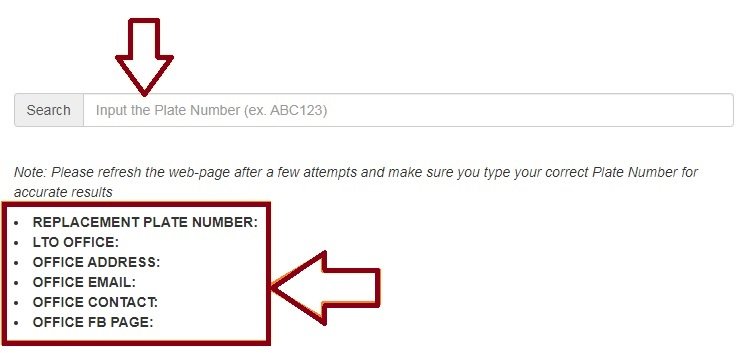
- As you enter your vehicle plate number correctly, the LTO Tracker will show up results with “Replacement Plate Number, LTO Office, Office Address, Office Email, Office Contact and Office FB Page” on your screen.
- If your plate number appears in tracking results, you can reach out concerned LTO Office for claiming process. You can also choose your desired LTO District Office or LTO Extension Office to pick up the replacement plates.
Requirements to Claim LTO Replacement Plates
To claim your vehicle replacement plates from the concerned LTO Office, you must provide all the required documents given below.
If You Are the First Owner of the Vehicle
- Photocopy of Certificate of Registration (CR)
- Latest Official Receipt (OR)
- Photocopy of Valid ID of Registered Owner
If you are the second owner and the transfer of ownership has not been done
- Photocopy of Certificate of Registration (CR)
- Latest Official Receipt (OR)
- Deed of Sale
- Photocopy of Valid ID of Vendor/Seller
- Photocopy of Valid ID of Vendee/Buyer
If You Are an Authorized Representative (Additional Documents)
- Authorization Letter from the Owner
- Photo Copy of Valid ID of the Representative
Track Motorcycle Plate with MV File Number
This service allows you to track your motorcycle plate by entering its MV File Number. This method is useful when the plate number is not mentioned in the Certificate of Registration (CR). Moreover, the motorcycle was registered in the LTO NCR New Registration Unit with MV File Numbers starting with 1301, 1303, 1336, 1366, 1380 and 1801.
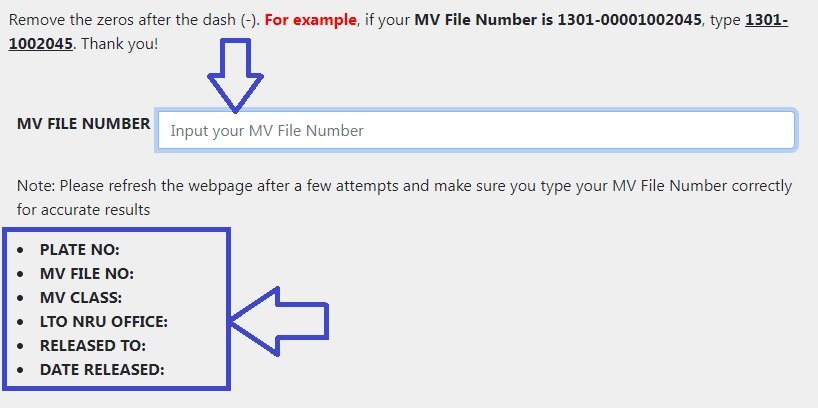
To track your motorcycle plates using MV File Number, just click on the button mentioned above. As you click, the below page will show up on your screen.
- The MV File Number is mentioned on the Certificate of Registration (CR).
- While entering the MV File Number, remove the extra zeros after the dash (-).
- Refresh the page after a few trials, make sure that you enter the MV File Number correctly.
- The tracking results will show “Plate Number, MV File Number, MV Class, LTO NRU Office, Released to and Date Released” details about your vehicle.
- If your vehicle plate is Released, contact your dealer to claim it.
- For more queries, reach out to concerned LTO NRU Office mentioned in the tracking result.
MV File Search Result Meaning
- No Record: Data Not Uploaded Yet
- Not Found: Plates are Not Yet Printed/Produced
- With LTO Office: Ready for Pick up
- Released: Plates are Sent to the Dealer
Check LTO Plate Number by SMS (Before October 2024)
If your vehicle was registered with LTO before October 2024 then you can check your number plate status by SMS.
- Type LTO<space>VEHICLE<space>Vehicle Plate Number.
- Send the SMS to 2600 and wait for a minute.
- Your will receive an SMS from LTO.
- The Message includes your vehicle plate number and other details.
If the SMS method does not work for you, kindly visit your nearest LTO Office to track the vehicle plate updates.
LTO CR Track Online (for Brand New Vehicles)
For a brand new vehicle, the Certificate of Registration (CR) has not been received yet. Such vehicle owners can track their CR with plate number. Just click on the LTO CR Tracking Tool given below.
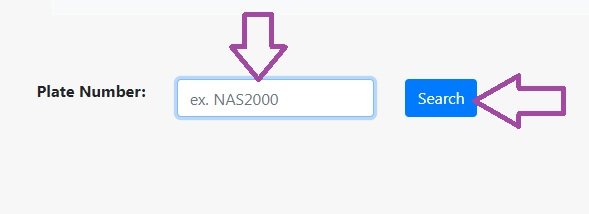
- Just enter your vehicle plate number in the box.
- Click on Search button.
- See the Result to know if your CR is released and sent to your Dealer.
- If your CR is still under process, wait for 1-2 days and track again.
The LTO CR Tracking Service is only for brand new vehicles initially registered at LTO NCR New Registration Unit 1301, 1303 and 1801.
Strict LTO Rules for CR, OR and Registration
Considering the Regular Registration Process for a Brand New Vehicle, it is processed in 7 working days from the date of sale. The process steps are given below.
- Dealer submits documents to LTO.
- LTO starts vehicle registration process.
- LTO generates OR and CR.
- LTO initiates the number plate procedure.
What to Do If CR is Delayed
If your vehicle Certificate of Registration (CR) is not released in 7 working days then you can file a complaint against the dealer. Submit your complaint to LTO with following documents.
- Vehicle Sales Invoice
- Your Valid Government Issued ID
- Complaint Letter
These rules apply to all LTO Offices under LTO NCR, if your vehicle registration was done outside NCR, please contact your local LTO Office.
Temporary CR Update 2026
The Land Transportation Office has faced the shortage of official CR paper. Therefore the LTO has started issuing a temporary CR to New Vehicles.
- The temporary CR is valid till the LTO prints the Original CR (Certificate of Registration) and released it.
- Once the Original CR is released, the LTO notifies the owner by an SMS or Email.
- The vehicle owner can collect their Original CR from the dealer or concerned LTO Office.
How to Get Vehicle Plates Delivered
The LTO provides Vehicle Plate Home Delivery Service for the vehicle owners’ convenience. Kindly note that the Vehicle Plate Delivery Service is neither automatic nor free. You must submit a request for delivery and pay the delivery fee online.
Before you request for vehicle plate delivery, make sure that your plates are printed and released to the concerned LTO District Office. Here are the steps to request LTO number plate delivery.
Step 1: Upload Documents
You should upload Clearly Visible Photos of a Valid Government ID and Vehicle OR/CR.
Step 2: Check Plate Availability
Please verify that your Vehicle Number Plates are already released and ready for pick up at concerned LTO Office.
Step 3: Provide Full Address
You need to provide your Complete Address for Easy Delivery Process. Include House/Flat No., Floor Number, Street Number, Area/Region, Nearby Landmark, Barangay, City/Municipality Name and Contact Number in your address.
Step 4: Pay Delivery Fee
Depending upon the distance between the LTO Office and your residence, you are required to pay the Delivery Fee between ₱150 and ₱600. You can pay the fee online via GCash or other.
Step 5: Wait for Approval
After fee payment, wait for the LTO to check your submitted details like address before dispatching the plates.
Step 6: Track Delivery Status
After the LTO dispatches your vehicle plates, you will receive an SMS containing the Courier Tracking Number and Dispatch Date & Time details.
You can use the tracking number to track your plates delivery status online. Generally, the LTO Plate Delivery Process takes 3 to 10 working days depending on your location. The delivery may be delayed up to 21 working days if your address is in a remote location.
How Long Does LTO Plate Delivery Take?
The vehicle plate delivery service is available across the entire Philippines, but the time required to complete the delivery may vary based on the distance and delivery locations.
- Manila City – Less than 4 Working Days
- Other Cities in National Capital Region (NCR) – 4 to 10 Working Days
- Cities Outside NCR – 10 to 21 Working Days
- Remote Locations – Up to 28 Working Days
LTO Vehicle Plates Pick Up Service
When the vehicle plates are released, the owner can visit concerned LTO Office to pick up the plates. Follow the steps given below.
- Track Plates Online to confirm that plates are ready for pick up.
- Visit concerned LTO Office between 8:00 AM and 5:00 PM from Monday to Friday.
- Carry Original OR/CR and a Valid Government ID. If You are a Representative, also carry an Authorization Letter from the Owner.
- Stand in a queue, wait for your turn, submit documents for verification.
- Check the plates match with your CR and plates are not damaged.
List of LTO NCR Offices
The LTO NCR Offices include the regional and district offices in National Capital Region. These LTO Offices handle new vehicle registration, renewal, driver’s license, number plate releasing and important transactions for concerned local residents.
To provide vehicle plate home delivery, the LTO Central Office coordinates with various district offices. Here I provide the list of major LTO NCR Offices as under.
| List of LTO NCR Offices | |
| Caloocan District Office | Muntinlupa District Office |
| Diliman District Office | Novaliches District Office |
| La Loma District Office | Parañaque District Office |
| Las Piñas District Office | Pasay District Office |
| Makati District Office | Pasig District Office |
| Malabon District Office | Pasig City Extension Office |
| Mandaluyong District Office | Pateros Extension Office |
| Manila East District Office | Quezon City District Office |
| Manila North District Office | Quezon City Extension Office |
| Manila South District Office | San Juan District Office |
| Manila West District Office | Taguig Extension Office |
| Marikina District Office | Valenzuela District Office |
| Navotas Extension Office | ––––––––––––––––––––– |
Services Offered by LTO (Land Transportation Office)
The Land Transportation Office is a government organization functioning under the Department of Transportation, Government of Philippines. It handles transactions related to motor vehicle and driver’s license as well as traffic control & management.
Here I provide the main functions and services of LTO as under.
- Vehicle Registration
- Driver’s License Issuance
- Vehicle Inspection
- Traffic Rules Enforcement
- Road Safety Promotion
- Transport Law Implementation
- Public Transport Regulation
- Vehicle Plate Issuance
- Driver Permit Processing
- Traffic Case Adjudication
Understanding MV File Number, Plate Number, CR and OR
If you have a motorcycle or motor vehicle, you should understand these four important terms called MV File Number, Plate Number, CR and OR, let me explain them one-by-one.
MV File Number
- The Motor Vehicle File Number (MV File Number) is a 15-digit unique number released by LTO to assign to a new vehicle on initial registration.
- The vehicle owner can use the MV File Number as a temporary reference number for the vehicle till the LTO releases the Number Plate for it.
- The vehicle owner can use the MV File Number to check LTO Registration Status and track vehicle plates online.
Plate Number
- LTO assigns a unique Plate Number is assigned to every vehicle in the country.
- The LTO and other officials use the Plate Number to identify a vehicle on roads.
- The owner can use the Plate Number to track New/Replacement Plates Status online.
CR (Certificate of Registration)
- The Certificate of Registration (CR) is an official document released by LTO when a new vehicle is registered first time.
- CR is the proof of vehicle registration and its ownership.
- It contains important information related to the vehicle and the owner.
OR (Official Receipt)
- The Official Receipt (OR) is the proof of payment for vehicle registration or renewal.
- It is required to complete the transaction of replacement plates and vehicle registration renewal.
New and Renewal Application Form Download
| New Application Form | Application Form: New Driving School Instructor |
| Renewal Application Form | Application Form: Renewal of Driving School Instructor |
LTO Helpline and Support (NCR)
For any query or enquiry related to LTO Number Plate Tracking, Driver’s License Status Check and LTO CR Enquiry, you can contact LTO Helpline and Support Team through various service options.
- LTO Helpline Number (NCR): +63 936-853-3934
- LTO Support Email (NCR): 1300rdmpao@gmail.com
- LTO NCR Messenger: Click to Connect LTO Messenger Channel
The LTO helpline number, email and messenger details mentioned above are only for LTO Offices located in the NCR (National Capital Region). If you live outside the NCR and have a query, please contact your nearest local LTO Office.
Conclusion
LTO Tracker is an online tool for tracking any vehicle plate status and driver’s license status in the Philippines. The Land Transportation Office (LTO) and Department of Transportation (DOTr) have developed the LTO Plate Tracker Online Tool for check vehicle license plate status and driving licenses at anytime and from anywhere.
I have explained the entire process of how to check vehicle plate status online at LTO Tracker portal. In case you still have a query or doubt, feel free to ask it in the comment section.
FAQs
Can I check my vehicle plate status online?
Yes, you can check your vehicle status online at ltotracker.com.
Can I track my vehicle plate online by plate number?
Yes, you can track your vehicle plate status online by its plate number.
My plate status is not found, what can I do?
If your plate status is not found by plate number at LTO Plate Tracker, you can track it with the MV File Number. The MV File Number is given on your vehicle’s Certificate of Registration.
How do I check my driver’s license status?
You can go to LTO Tracker Portal to check your driver’s license status online. You must provide your driver’s license number and birth date to track its current status
Last Updated on May,2026
Plate number
Honda click 125
Plate, FO4931
LTO Jaro Iloilo
Dealer Guanson Balasan
Date Jan 20 2026
Hello Sir pwede mag tanong kung saan mag inquire lng plate # ko sa private car,. salamat
Unti now is down system!!
Is there something wrong with your website on lto tracker. I cannot trace my license plate through your tracker. Please give response and update.
down parin ang system galing
tracker is not working
Failed to claim the delivery of the plate #. How to request redeliver? System is down, I don’t know where to ask for assistance.
Until now we cant check
My plate i think 3 months already but not yet deliver . And i cannot log in in lto portal. Can you help me thankyou.
Sir bat ang tagal ng plate number ko
PINADELIVER KO PO PLATE NUMBER KO SA BAHAY ONLINE SA WEBSITE PO NANG LTO last october 2025 hangang ngayon wala padin po nadatin ilan buwan na po lumipas plate number WET 552 ADVENTURE
SALAMAT PO MATULUNGAN PO NINYO AKO SALAMAT
MC bought in 2018. LTO Tracker is still down. Where can I get updates or request for my MC’s plate #?
M. Mendoza says:
Feb. 11, 2026
Paid for the delivery of my plate (TQA657) from the LTO Araneta Ave. branch to my Bgy. Batasan residence last July of 2025, seven months have gone by, but still no deliveries to date. Which LTO office can I follow up with, as your website has been down for quite some time now?
I think you should inquiry to your nearest LTO branch.
Sir bkt Ang tagal nang plate number ko
How can’t I get my plate number
My maintenance ba ung LTO Tracker ngaun. Sir
How do we received are plate numbers?.. it was ordered last year . Until now.. it wasn’t deliver.. and the system is still down..
Sir/Ma’am gusto ko lang naman malaman saan ko makukuha ang plate number ng aking motor
Lagi po down system yung online tracker last year ko pa po pinadeliver hanggang ngyo 2026 na wala padin dumadating baka may solution po kayo kasi bayad naman na delivery fee eh ang sabi 5-10 working days lang bago dumating
Gud day po…requesting for copy of certification for new plate no. D2103F…tnx
2019 pa yung motor wala plaka 7 years na, July 2025 nakita na sa system at nag bayad ako para ma deliver na, pero hanggang ngayon wala pa din, down ang system ano ba yan LTO, ilang year ba bago ma deliver? 7 years ba ulit mag iintay
I would like to know if the new license plates for GTE-154 are ready for pick-up in Robinson’s Galleria, Cebu City. I have been trying to search online but the official ltotracker website is always down.