
LTO Portal New User Registration and Login
The LTO Portal is the official website of the Land Transportation Office. The online LTO services are handled under the Land Transportation Management System (LTMS). Both the LTO Portal and the LTMS Portal are two different names of the same website.
An individual person who has registered on LTO Portal, can do LTO Portal Login. If you have not registered yet then you must complete online registration at LTO Portal first and then proceed to login.
If you have already registered in the LTMS Portal, you can login with your required details.
LTO Portal Registration Requirements
There are some key requirements for LTO Portal Registration. Here, I provide them in detail for you.
Existing Driver’s License Details [If Already a License Holder]
- Driver’s License Number
- License Serial Number
- License Expiry Date
Alien Certificate of Registration (ACR) Details [If Not a Filipino Citizen]
- ACR Number
- ACR Expiration Date
- Nationality
Personal Details
- Applicant’s Name (Last Name, First Name and Middle Name)
- Birth Date
- Gender
- Mother’s Maiden Name (Last Name, First Name and Middle Name)
Contact Details
- Applicant’s Email Address
- Applicant’s Mobile Number
Make sure that you have all required information handy before you start LTO Online Registration Process.
LTO Portal Registration Process
You should have a mobile phone or a computer/laptop with internet to register yourself on LTO Portal. Here I provide a step-by-step process for it.

- Go to official LTO Portal website at portal.lto.gov.ph.
- Click on Register Now option.
- Read the instructions, tick the box, enter the Captcha Code and click on Next button.
- Select Enroll As An Individual option.
- Click on Yes if you already have a driver’s license or select No if you don’t have it. If you have a license, provide your License No., Serial Number and Expiry Date. Then click on Next.
- Select Yes if you are a Filipino Citizen or select No if you are not a Filipino Citizen. If you selected No then provide your ACR Number, Expiration Date and Nationality. Then click on Next.
- Provide your personal information including your Full Name, Birth Date, Gender and your Mother’s Maiden Name. Then click on Next.
- Provide your Email Address twice and your Mobile Number with country code. Then click on Create Account.
- Check your Inbox for a new email from LTO, open it and save your LTO Client Number. Click on the link given in the email message to Activate Your LTMS Account.
- Create a New Password, enter it again and click on Set Password for Login.
- Provide emergency contact details as well as your general and medical information. Then click on Submit to complete the process.
In this way, you can complete LTO Portal Registration Process. Please save and remember your Email, LTO Client Number and Password as you will need them for LTO Portal Login purpose later.
LTO Portal Login Requirements
In order to access LTO Services Online, you must login to the LTO/LTMS Portal and you must have required details for the login process. Here I provide LTO Portal Login Credentials that you must keep handy whenever you want to login.
- Register Email Address
- LTO Client Number (If Email is forgotten)
- Login Password
So, you can sign in to LTO Portal with help of your Registered Email and Password OR your LTO Client Number and Password.
LTO Portal Login Process
The LTO Portal Login Process is very easy, here I provide the steps for the same.
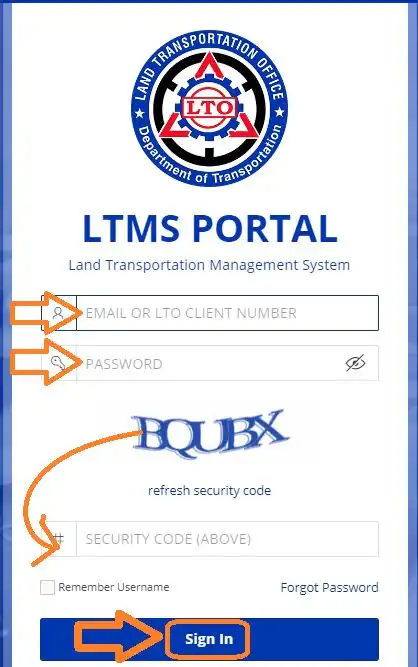
- Go to LTO Portal website at portal.lto.gov.ph.
- Click on Login option.
- Provide your Registered Email or LTO Client Number.
- Then provide your Password.
- Finally, enter the Captcha Code correctly and click on Sign In.
- After login, you can access all LTO Services 24×7.
In this way, you can login to LTO Portal anytime using your mobile or computer/laptop with internet for accessing all LTO Services online.
Reset Forgot Password at LTO Portal
The LTO Portal Login Process requires two important details. The first detail is your Registered Email or LTO Client Number and the second detail is your Password.
If you have forgot your LTO Login Password then you cannot login to LTO Portal. In this situation, you are required to reset the password, create a new password and then you will be able to login to LTO Portal website. Check out the steps shared below to learn how to reset forgot password for LTO Portal Login.
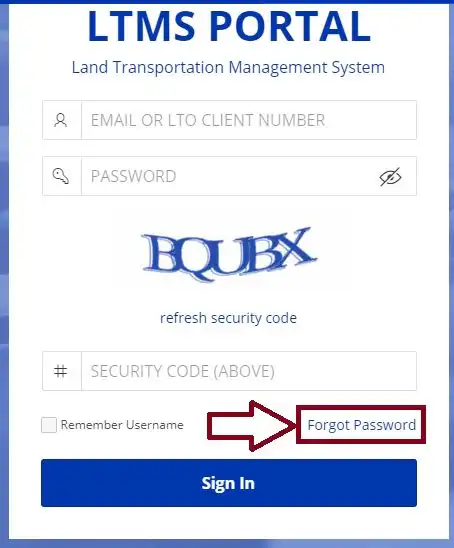
- Go to LTO Portal website at portal.lto.gov.ph.
- Click on Login option.
- Find and click on Forgot Password option.
- Provide your Registered Email or LTO Client Number.
- Click on OK to proceed.
- Check your inbox for a new email from LTO.
- Open the new email message and click on LTO Password Reset link.
- Follow on-screen instructions to reset forgot password for your LTO/LTMS Account.
- Create a New Strong Password and confirm it.
After you reset the Forgot LTO Password, you can login to LTO Portal with your Email/LTO Client Number and New Password.
Online Services Available at LTO Portal
The Land Transportation Office provides various online services on the LTO Portal. These services are useful for every individual person looking for a service related to driver’s license, motor vehicle, violation/fine check & payment and others.
The LTO Online Services are available to access for registered users only. It means that you must register yourself and login to LTO Portal to access its online services. Here I provide the list of services available after LTO Portal Login as under.
- LTO Appointment Booking for New License, License Renewal, Vehicle Registration/Renewal, Exams/Tests and others.
- Online Application for Student Permit or Driver’s License New, Renewal, Replacement, Change of Classification (Non-Pro to Pro).
- View/Download eDL (Electronic Driver’s License).
- E-Learning Course of Comprehensive Driver’s Education (CDE) from LTO.
- Appear in CDE Exam Online and Obtain/Download CDE Certificate.
- Motor Vehicle Registration New, Renewal, Transfer/Change of Ownership and Get Duplicate OR/CR.
- Check LTO Violations and Pay Fines Online including All Traffic Violations, Demerit Points and Fines.
Conclusion
The LTO Portal provides a variety of services related to student permit, driver’s license, vehicle registration, LTO appointment booking, violation/fine check and pay and many others.
All LTO Services are available online for registered users only. The users who have registered, can login to LTO Portal anytime to access all LTO Services without any interruption.
The LTO Portal Login is a simple process that you can do with help of your Email/LTO Client Number and Password. After login, you can find and access your desired online service from anywhere in the Philippines.
I hope that this information has been useful for you. In case you still have any doubt, you can ask it in the comment section. Kindly check the FAQs and their answers given here to learn more about LTO Portal Login and online services.
FAQs
Can I apply for New Driver’s License online?
Yes, you can apply for New Driver’s License online at LTO Portal.
Is LTO Portal Login mandatory to apply for driver’s license?
Yes, the LTO Portal Login is mandatory to apply for driver’s license and to access other services.
Can I book online appointment at LTO Portal?
Yes, you can book online appointment at LTO Portal for Student Permit, Driver’s License, Vehicle Registration, CDE Exam and other purposes.
How do I login to LTO Portal?
You can login to LTO Portal with help of your Registered Email and Password. You can also use your LTO Client Number and Password for LTO Portal Login easily.