LTO Violation Check Online 2026
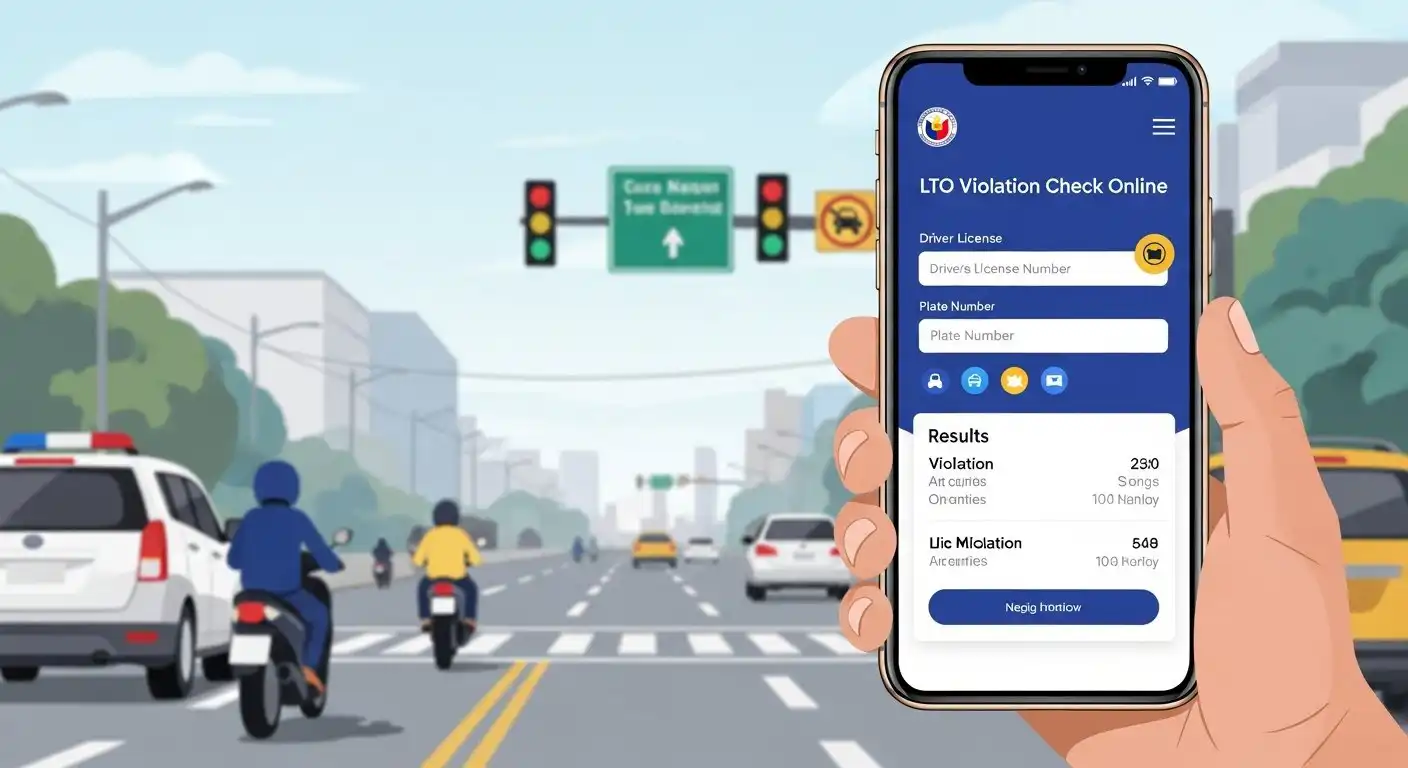
Land Transportation Office, Department of Transportation (LTO, DOTr) offers an online service called LTO violation inquiry. All student permit and driver’s license holders can use LTO violation check online service to know about their unsettled fines and pay them easily.
The LTO violations include all violations related to driving, traffic rules and vehicle maintenance regulations in the Philippines. You can also check your vehicle plate status LTO Plate Tracker.If you want to check your violations in LTO, you can do it online at LTMS portal or visit an LTO Office near your residence.
3 Easy Ways for LTO Violation Check
The Land Transportation Office allows people to check their violations and fines with three different methods. Out of them, one method requires you to visit the LTO Office, while other two methods let you check LTO violations online.
- LTO Violation Check Online at LTMS Portal
- Visit LTO Office for LTO Violation Check/Inquiry
- LTO Violation Check by SMS
Now, let us understand each method of LTO violation check in detail.
LTO Violation Check Online at LTMS Portal
The LTMS stands for Land Transportation Management System, the LTO has created LTMS Portal to provide a single platform to allow people to access licensing, vehicle, digital ID, transactions and violations related services. Here I provide a step-by-step guide about LTO violation online check as under:
#Step 1: Go to LTMS Portal and Select Login

Just open a web browser on your device and go to LTMS Portal website at portal.lto.gov.ph.
On LTMS Portal homepage, you can see two options as Register Now and Login. To check your violations online, you must login to your LTMS Account. Please click on Login button to open the LTMS Portal Login Page.
#Step 2: Provide Your Login Credentials
As you click on Login, a new small window will open on screen. Here you need to provide your login credentials. You can sign-in to LTMS Portal with help of your registered Email and Password or you can provide your LTO Client Number and Password to login to the LTMS Portal to access your LTMS Account.
#Step 3: Enter Captcha Code and Click on Sign-In
After entering your Email/LTO Client Number and Password, the next one is the Captcha Code Box. Kindly enter the Captcha Code same as given in image and then click on Sign-In button to proceed.
#Step 4: Select Violations Option
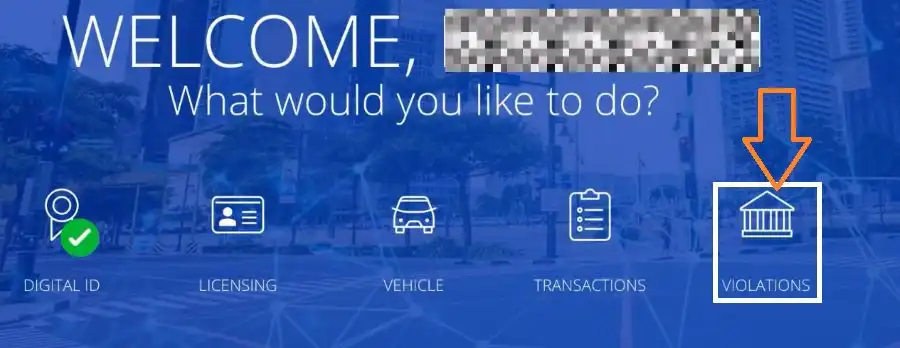
After successful login, you can see various services options on the screen. Out of them, you can find Violations option on right side, you must click on it to open LTO violations check page. It will let you check violations on your driver’s license or student-driver’s permit/license.
#Step 5: Click on Unsettled Tab
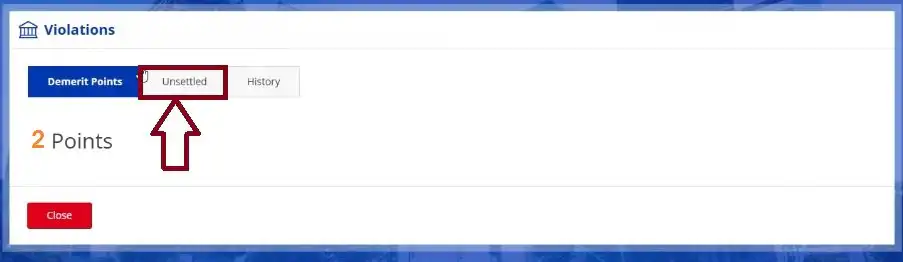
As you click on Violations option, a new small window will show up on screen. There are three tabs with different information. The first tab is called Demerit Points, the second tab is called Unsettled and the third tab is called History.
With each violation act, some demerit points are added to your driving license/permit. You need to click on Unsettled tab to view your unsettled violations and unpaid fines.
#Step 6: Check LTO Violations and Fines
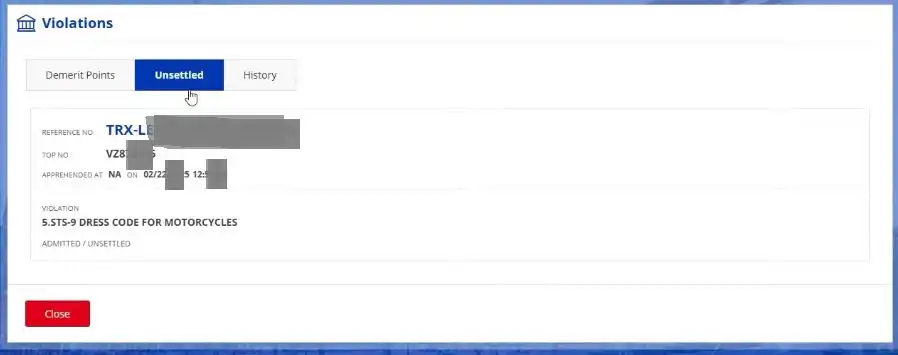
As you click on Unsettled tab, you can check the list of LTO violations on your driver’s license/permit. Kindly note that this shows the violations and fines that you have not paid yet. Once you pay the fines, the violations will disappear from Unsettled tab and added to the History tab.
If you see nothing in Unsettled tab, it means that there are no pending violations on your driver’s license at present. It also indicates that you have paid all unsettled violations/fines that were charged on you in the past.
#Step 7: Pay the Fines Online to Settle Violations
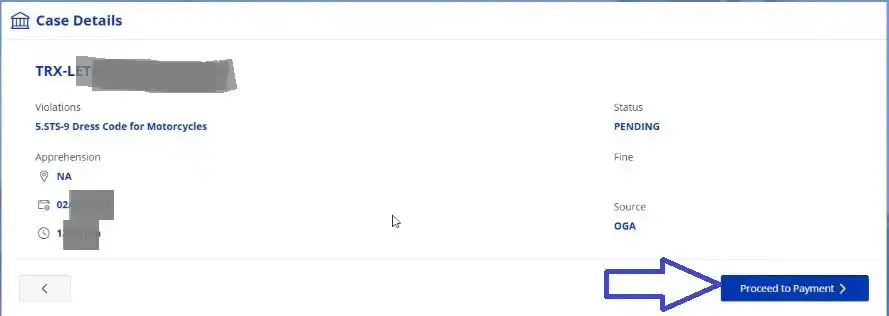
The LTMS Portal offers online payment service to allow you to settle your LTO violations by paying respective fines immediately.
To settle violations and pay fines, just click on respective violation, check details and click on Proceed to Payment. You can pay the LTO violation/fine online by a credit card or other method as offered by LTO LTMS Portal.
Once the payment is successful, you should save the payment receipt and check the Unsettled tab again to see if there is any violation left or all settled. If the Unsettled tab is empty then sign-out of LTMS Portal and close the web browser on your device.
Visit LTO Office for LTO Violation Check
The Land Transportation Office has multiple LTO branches in every city of the Philippines. The LTO violations check and fines payment services are available at all LTO Offices across the country. It means that you can visit your nearby LTO Office to check your violations and settle them by cash payment.
- Click here to Check LTO Directory and find an LTO Office Branch near you.
- Check the list of branches/office and select an LTO Office that is close to your location.
- Note down the LTO Address and prepare required documents i.e. your student permit or driver’s license and any valid Government ID.
- Visit your nearest LTO Office on a working day.
- Go to the service counter, stand in a queue and wait for your turn.
- Give your driver’s license/permit to the service executive and ask for checking unsettled violations. You may need to provide other Government ID if asked.
- The service executive will find and tell you about all pending violation on you.
- You can pay the fine amount by cash to settle your LTO violations.
- Collect the payment receipt and your driver’s license/permit from the executive.
- Exit the LTO Office after settling all LTO violations.
So, this is how you can check LTO violations at an LTO Office and settle them by paying fines in cash.
LTO Violation Check by SMS
Earlier, the Land Transportation Office used to provide 2600 SMS Verification Service for vehicle plate and driver’s license validity check as well as LTO violation check facility. But the LTO made an important announcement related to this service that I am sharing here with you.
Recent Update on LTO SMS Service
In October 2024, the Land Transportation Office (LTO) announced that the 2600 LTO SMS Verification Service is not connected to the new LTO System (LTMS). The SMS Verification Service is connected to the old LTO IT System only.
The LTO’s announcement clearly states that the SMS Verification Service does not work for new LTMS Accounts linked vehicle plates and driver’s licenses/permits.
If your account/license belongs to the LTO IT System (old) then you can check LTO violation by SMS using the format given below.
- Type LTO<space>Driver’s License Number
- Send the SMS to 2600
- Avoid “-” when typing your driver’s license number
- The SMS Service is chargeable to ₱2.50 per SMS
If you created your LTMS Account in the New LTO System then the SMS Service will not work for you. To check LTO violation on your student-driver’s permit or driver’s license, you can login to LTMS Portal (method 1) or visit the LTO Office (method 2).
LTO Violation Check Fee
The Land Transportation Office provides two main methods for LTO violation check online and offline. Both the methods are completely free, you do not need to pay any fee for checking LTO violations on your driver’s license/permit.
In case you use LTO SMS method, it is chargeable to ₱2.50 for each SMS message. But the SMS method does not work with New LTMS System, so I recommend you to use other two methods to check your LTO violations without incurring any cost.
LTO Violation Fine Payment Deadline
As per New Rules introduced by LTO in January 2026, the motorist (person) must settle their LTO violation and pay the fine in 15 working days from the date of apprehension i.e. violation ticket issue date.
The 15 working days do not include Saturday, Sunday and any public holiday. You can choose to settle the violation by paying applicable fine online at LTMS Portal or pay the fine by cash at the LTO Office.
Consequences of Not Paying LTO Violation Fine On Time
The LTO Authority provides 15 working days to settle violations and pay fines. You can choose to pay the fine online or in-person as per your convenience but you must settle the payment in 15 working days from the violation date.
If you fail to settle LTO violations/fines in 15 working days then,
- LTO will suspend your driver’s license/permit. It will remain suspended until you settle the payment.
- LTO will add up to 50% surcharge on the unsettled fine amount, so the total payable fine amount will be increased.
- LTO will prevent you from applying for new vehicle registration, vehicle registration renewal and driver’s license renewal as long as there are unsettled violations & fines on you.
To avoid additional surcharge and suspension of driver’s license, you should always stay aware about your LTO violations and settle them in the given time.
LTO Violation Demerit Points
The LTO Authority has attached demerit points with all traffic violations. For every violation act by a motorist (person), some demerit points are added to their driver’s license. The demerit points system works based on the seriousness of the violation done by the motorist/person.
For example:
- If you forgot to wear seat-belt while driving, the LTO will charge ₱1000 fine for first time and add 1 demerit point to your license.
- If you cross or avoid traffic signs/signals while driving, the LTO will charge ₱1000 fine and add 2 demerit points to your license.
- If you do reckless driving or driving under influence of alcohol/drugs, the LTO will charge ₱1000 fine and add 5 demerit points to your license.
So, the number of demerit points added to your license depends on the level of seriousness of the violation done by you. The LTO charges higher fine amount for repeated violations.
Impact of Demerit Points On Your License
The demerit points are added directly to your driver’s license for each act of violation. As the demerit points get accumulated, they start creating a serious impact on your license. Let me explain it further to help you understand it.
- When 5 demerit points are accumulated, the LTO will force you to complete the reorientation course. If you don’t complete the course in 30 days, the LTO will suspend your driver’s license.
- When you repeat same violation 3 times or 10 demerit points are accumulated, the LTO will force you to complete the reorientation course and pass the theoretical exam. If you fail to complete the course & exam in 30 days, the LTO will suspend your driver’s license.
- With 5 demerit points accumulated on your student permit, the LTO will revoke your permit and won’t allow you to apply for a new student permit for one year.
- With 10 to 39 Demerit Points, the LTO will Not allow you to change the classification of your driver’s license. For example: Upgrading your license from motorcycle to car or car to light truck or non-professional to professional, all these processes are prohibited if you have demerit points between 10 and 39 points.
- Once your license has 40 demerit points, the LTO will revoke your driver’s license and you are Not allowed to apply for a new driver’s license for two years.
- With 1 or more demerit points, the LTO allows you to renew your driver’s license with only 5-year validity.
- With zero demerit points, LTO allows you to renew your driver’s license with 10-year validity.
So, this is how demerit points added to your driver’s license/permit and they have a big impact on your license.
Summary
The LTO Authority allows all driver’s license and student permit holders to perform LTO violation check online at LTMS Portal and in-person at all LTO Offices/Branches in the Philippines.
Above I have explained how to check LTO violations online and offline with step-by-step guide for each method. In case you still have a doubt or query, you can ask it in the comment section.
FAQs
Do I have any violation on my LTO/LTMS Account?
You must login to LTMS Portal to check if you have any violation on your LTO/LTMS Account.
Should I check LTO violation online or offline?
You should check LTO violation online to save time because offline process requires you to visit an LTO Office. If the LTO Office is close to your home then you can visit there for checking LTO violations in-person.
How do I settle my LTO violations and fines?
You can settle your LTO violations and fines online by making payment thru LTMS Portal.
Can I pay LTO violations fines at LTO Office?
Yes, you can pay the LTO violations fines at LTO Office, visit your nearest LTO Office, do an inquiry and pay the fine amount by cash.
Can I contest an LTO violation?
Yes, you can contest an LTO violation if you really believe that you did not violated any rule and you also have a valid evidence to prove your point. Just visit an LTO Office with your driver’s license/permit and the evidence, then submit your request with help of an LTO service personnel.
How can I avoid LTO violations?
You can avoid LTO violations by driving your motorcycle/car completely as per traffic rules as well as keeping your driver’s license and vehicle registration papers up-to-date.