LTO Driver’s License Renewal Online Process and Requirements

The LTO Driver License Renewal is an essential process for every license holder in the Philippines. LTO Driver’s License comes with 5 year validity. Before the license expires, you should apply for LTO driver license renewal to continue driving your motor vehicle in the Philippines.
The Land Transportation Office accepts LTO Driver’s License Renewal Application online at LTO-LTMS Portal and also at all LTO branches.
When Can I Renew My Driver’s License?
The LTO recommends that license holders renew their driver’s license before the expiration date, as it is a safer option compared to a last-minute rush for renewal.
Here I provide three different time phases when you can renew your driver’s license and their consequences.
- Renew Up to 60 Days Before Expiration Date – Safest Available Option
- Renew on Exact Expiration Date – Less Safer, Last Minute Rush
- Renew After Expiration Date – Not Safe, Penalty for Late Renewal, Not Allowed to Drive till Renewal License Release
Why Renewal Timing Matters
- The driver’s license renewal timing matters because the early renewal gives you enough time to complete the renewal process as your current license is still valid.
- Renewing your driver’s license exactly on its expiration date saves you from the penalty but it makes you rush on the last minute as you have only one day to complete the entire renewal process. If you miss the date or fail to complete the process in one day, for whatever reason, you will be liable to pay penalty for late renewal.
- Renewing your driver’s license after expiration date has serious consequences. First of all, you cannot drive any vehicle until your license is renewed and you collect your license from the LTO Office. The second issue is penalty, you must pay the penalty for late renewal along with application/computer fee and license fee during the renewal process.
To check your vehicle plate status, you can use the LTO Tracker Online.
LTO Driver License Renewal Requirements
The LTO driver’s license renewal process requires certain documents, certificates, and your personal details. Before you visit an LTO Office to apply for driver’s license renewal, you must know its requirements and prepare yourself for the same.
[1] Current Driver’s License:
You must have your original current driver’s license when applying for renewal. You need to carry your current license to the LTO Office and submit it along with your LTO driver’s license renewal application.
Whether your current license is valid and expired, you must bring it to the LTO Office for the renewal process.
[2] Medical Certificate:
You must visit an LTO Accredited Clinic to go through physical fitness test and mental fitness test. Then the clinic will release a medical certificate to you and it will also send a digital copy of your medical certificate to the LTO.
You must carry the medical certificate (physical copy) to the LTO Office for your driver’s license renewal. The medical certificate is the proof of your health status. You are eligible to renew your driver’s license only if you are physically and mentally fit & healthy.
[3] Completed CDE (Comprehensive Driver’s Education) Program:
As per LTO Rules, the driver’s license holder applying for renewal first time, is required to complete Comprehensive Driver’s Education (CDE) Program and go through CDE Presentation Materials Online at LTMS Portal.
[4] Passed CDE Online Validation Exam:
As per LTO Rules, the driver’s license holder applying for renewal first time, is required to attend and pass the CDE Online Validation Exam at LTMS Portal. You must login to LTO-LTMS Portal to attend the CDE Validation Exam and pass it.
Kindly note that the CDE Program and CDE Validation Exam are mandatory only for the applicants renewing their license first time. Thereafter they do not need to do it.
[5] No Unsettled Violations:
You must settle all the violations and pay all pending fines before applying for LTO Driver’s License Renewal in the Philippines. The Land Transportation Office will not accept your driver license renewal application if there are unsettled violations on your license.
[6] Duly Accomplished Application Form:
You must fill up the Driver’s License Application Form with your personal information. You must carry the duly accomplished APL Form to the LTO Office to submit it with required documents to renew your driver’s license and complete all steps to get your license issued by the LTO Authority.
If you have applied for driver license renewal online at LTMS Portal, take printout of your application form and carry it to the LTO Office on your appointment day.
[7] Valid Work Visa (for Foreigners Only):
If you are a foreigner living in the Philippines, you must have a valid work visa when applying for Driver’s License Renewal. You should carry your visa copy to the LTO Office and show it as an evidence for the license renewal process.
[8] COC of Training of Special Purpose Vehicle (SV):
If you have applied for driver’s license renewal for a special vehicle then you must complete the training in the operation of Special Purpose Vehicle (SV) and obtain Certificate of Completion (COC) from an office or association or institution recognized by the Government of Philippines.
[9] Passed Theoretical Exam and Practical Driving Test (If License is Expired 2+ Years Ago]
If your driver’s license was expired longer than 2 years ago then you must appear and pass the Automated Theoretical Exam and the Practical Driving Test as per LTO Rules.
If your driver’s license was expired in last 2 years then you are not required to pass the theoretical exam and practical test.
[10] Renewal Fee Payment Receipt
If you have applied for driver’s license renewal online then you have also paid the fee online. In this case, you are required to carry the fee payment receipt to the LTO Office on your appointment day. You should print the receipt immediately after online fee payment and keep it safely to submit with your driver’s license renewal application form to the LTO Office.
LTO Driver’s License Renewal Fees
In order to renew your driver’s license in the Philippines, you are required to pay the renewal fees as under:
- Application/Computer Fee: ₱100
- License Fee: ₱585
If you renew your driver’s license before expiry, you need to pay the above mentioned fees and no additional charges or penalties.
LTO Driver’s License Renewal Associated Charges
Before you apply for LTO Driver’s License Renewal, you must undergo a medical examination at an LTO Accredited Medical Clinic and obtain a medical certificate. The medical examination will cost ₱300 to ₱500 depending on the clinic you choose for your medical fitness test.
Penalty for Late Renewal of Driver’s License
If you apply for driver’s license renewal after your current license is expired, you are required to pay the penalty for late renewal. The penalty amount varies based on the time period between your license expiry and your renewal application.
Here I provide the penalty for driver’s license renewal after expiry i.e. late renewal.
- License Expired for 1 Day Up to 1 Year: ₱75
- License Expired for more than 1 Year Up to 2 Years: ₱150
- License Expired for more than 2 Years: ₱225
LTO Driver License Validity After Renewal
When you apply for LTO driver license renewal, the Land Transportation Office provide two validity options based on traffic violations committed by you.
- You get 10 Year Validity for your Driver’s License on Renewal if you have NOT done a single traffic violation in past five years.
- You get 5 Year Validity for your Driver’s License on Renewal if you have done one or more traffic violations in past five years.
How to Renew LTO Driver’s License: Step-by-Step Process
Before you start LTO driver license renewal process, you must have gone through the medical examination and obtained your medical certificate from an LTO Accredited Clinic.
Keep your medical certificate, current license and other documents handy when applying for driver license renewal.
LTO Driver License Renewal Online Process
The LTO offers various online services at LTMS Portal, you can login to access these services using your phone or computer. You can apply to renew your driver’s license online at LTMS Portal and then visit the LTO Office to finish the process.
Step 1: Go to LTO-LTMS Portal and Login
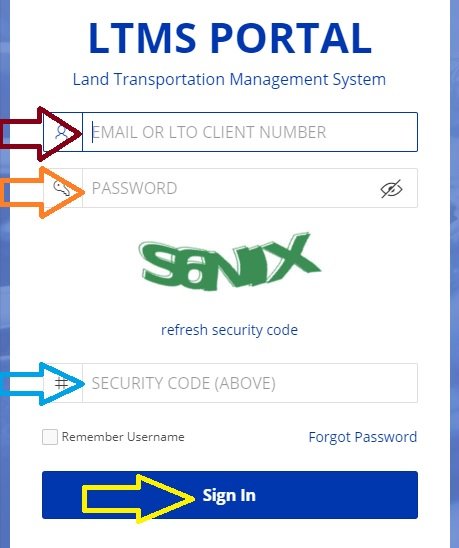
Go to LTO-LTMS Portal website at portal.lto.gov.ph. On the homepage, find and click on Login option. Enter your Registered Email and Password or your LTO Client Number and Password. Then enter the Security Code and click on Sign-In button.
Step 2: Select Licensing option
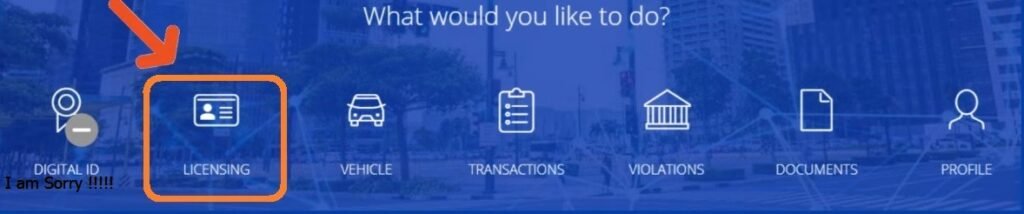
After successful login, you need to select Licensing option to continue.
Step 3: Add Medical Certificate
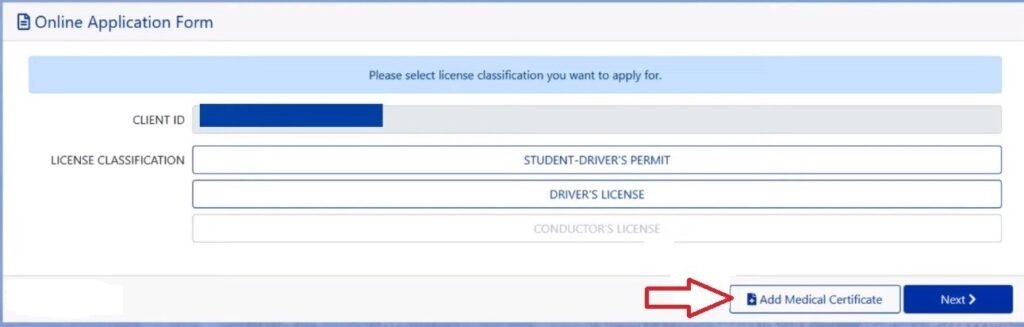
As you click on Licensing, the Online Application Form will show up on screen. Please click on Add Medical Certificate, enter your Medical Certificate Number in the given box and click on Verify.
Step 4: Select Driver’s License option and Click Next
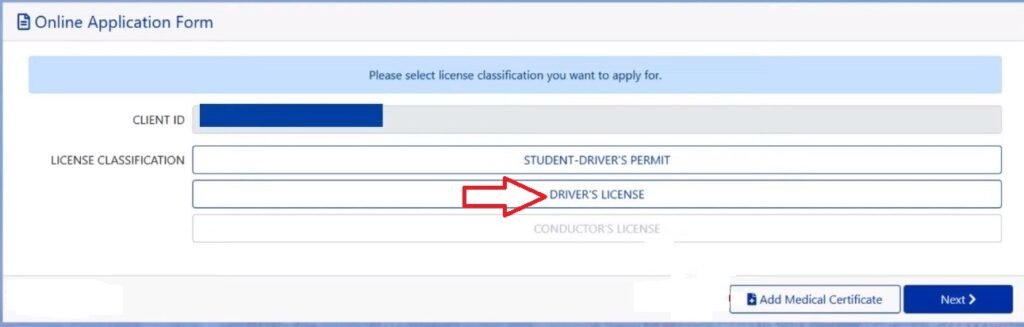
Now select Driver’s License option and click on Next button to go to next page.
Step 5: Select Renewal option and Click Next
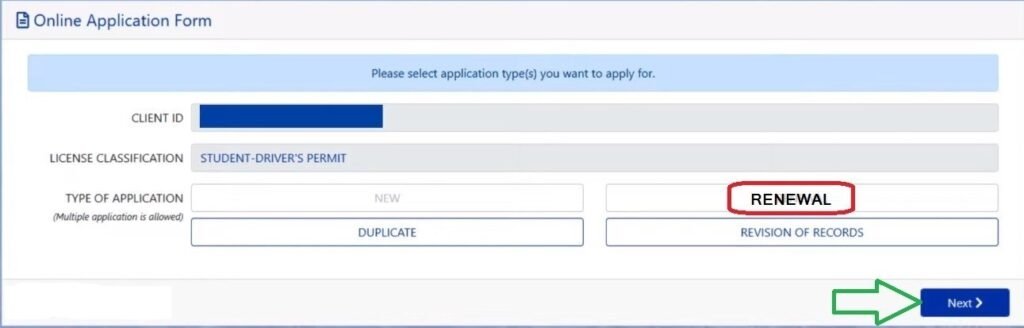
Here you can see four options called New, Renewal, Duplicate and Revision of Records. Out of these options, select Renewal option and click on Next button.
Step 6: Set Appointment, Pay Renewal Fee and Print Receipt
Select your nearest LTO branch for your appointment. Choose your preferred appointment date & time slot. Thereafter you need to pay the driver’s license renewal fee online via GCash or any other payment option.
Complete the fee payment to confirm the LTO Appointment. Then print the payment receipt as you will need it on the appointment day.
Step 7: Visit LTO Office to Complete Renewal Process
You need to visit your selected LTO branch to complete the renewal process. Carry all required documents in original and photocopies, and reach the LTO Office before 10 minutes of the given appointment time.
Enter the LTO Office and go to Licensing section. Wait for your turn and submit your documents to the LTO Personnel. Wait for the verification of documents and move towards biometrics section when they ask you.
Update your fingerprints, signature and get your photo captured. Then go to the waiting area.
Step 8: Collect Your Driver’s License and Leave
You need to wait for a few minutes to your name get called up by an LTO Personnel. Go to the service desk to collect your Driver’s License and check it thoroughly. Don’t forget to get your original documents back before you leave the LTO Office.
By following these 8 steps, you can apply for driver’s license renewal online at LTMS portal and then visit the LTO branch to complete the final steps and collect your license at the end.
LTO Driver License Renewal Offline [Walk-in Application]
In case you want to do a walk-in application to renew your driver’s license, you can visit your nearest LTO Office. Before going to the LTO Office, you should download & print the Application Form PDF and fill up the form with required information. It will save a lot of time at the LTO Office.
During walk-in application for driver license renewal, you must pay the renewal fees at the LTO Office. Please carry both the cash and card so that you can use them for easy & quick fee payment.
- Find an LTO Branch/Office near your location.
- Visit the LTO Office in the early morning around 8:00 AM to 8:30 AM because there are less people at that time.
- Move to Licensing section and submit your Application Form, Medical Certificate and other documents for driver’s license renewal process.
- Wait for a while as the LTO Personnel is verifying your documents.
- Move towards Cashier and pay the renewal fees as applicable. You can pay cash or use a card as asked by the cashier.
- Collect payment receipt and move towards biometrics section.
- Update your fingerprints, signature and get your photo captured.
- Wait for a few minutes when your driver’s license is under process.
- When your name is called, go to the desk and collect your driver’s license.
- You can exit the LTO Office after collecting your license.
In this way, you can apply for LTO driver’s license renewal in-person at an LTO branch and complete the process to get your license.
Pro Tips for Smooth Renewal of Driver License
The LTO driver license renewal process is straightforward but it has strict rules about renewal requirements and in-person visit. Here I provide five pro tips to make your driver’s license renewal process smoother and time saving.
- Online Apply for Renewal at LTMS Portal to Set Appointment in advance and save time at the LTO branch.
- Always choose an LTO branch that is near your home/office so that you can reach there without traveling much.
- Double-check required documents before going to the LTO Office on appointment day.
- Always carry a valid Government Issued ID (Original) for identity verification if needed during renewal process.
- Always renew your driver’s license before expiry to avoid paying penalty and restrictions on driving.
With these five amazing tips, you can make your driver’s license renewal process faster.
Bottom Line:
The LTO Driver License Renewal is an essential process for every license holder in the Philippines. When your driver’s license is likely to expire, you can follow the guide shared above to renew your driver’s license without any mistake.
Above I have explained LTO driver license renewal requirements, renewal fees, step-by-step process to renew driver’s license as per LTO rules. In case you still have any query, you can ask it in the comment section.